Crownhold Controls and Interface
How to play with a mouse, fix disappearing upgrade boxes, and keep your save.
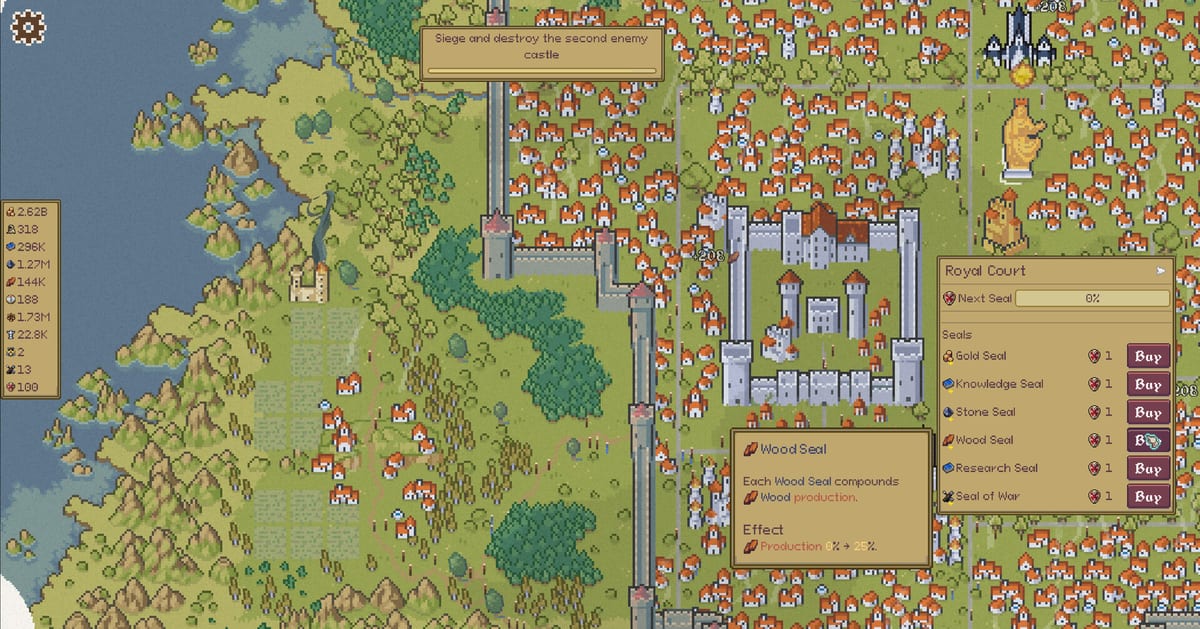
Crownhold is built for a mouse. Steam lists a mouse-only option, partial controller support, adjustable text size, custom volume, camera comfort, save anytime, and play-at-your-own-pace. This controls page is the practical version: where to click, why panels vanish, and how not to lose a run. It sits next to Getting Started and How to Play because the hover box is the game.
Primary actions
Move the cursor onto the keep, a workplace, a village, the university, or the harbor. A panel lists upgrades and worker buttons. Click the building itself for a small resource bump (castle gold, university knowledge, guild stone/wood). Assign population from the HUD, then spend it on peasants, scribes, laborers, or scholars at the matching site.
There is no documented keyboard hotbar of skills. You are not weaving cooldowns. The skill is keeping the correct panel open long enough to click the upgrade you meant.
Hover hitboxes
Demo reviewers called out the upgrade box: you hover a resource, the panel appears, you move toward a button, the box dies. In a click-heavy game that friction is loud. Practical workarounds from playthroughs:
- Approach the panel from the side that stays over the building’s hitbox.
- Buy upgrades in short bursts so you are not steering across a huge menu.
- If the screen fills with stuck notifications, press Escape and choose Resume. If that fails, return to title and continue. Saves are anytime plus Steam Cloud.
King is Watching (a prestige node) makes hovering even more important because production rises while you sit on a building. That is a feature, not a reason to fight the hitbox all session — park on the guild when wood is the goal.
Menus that feel like game over
The prestige book and monument can look like they ended the run. They often did not. Escape, Resume, or Continue from title puts you back on the map. Only an explicit “end your run / reset expansion progress” prompt is the real prestige confirm. Details in how to prestige.
The world map for discovery is another overlay. Click tiles to spend discovery; do not panic if a lighthouse or eagle icon is unclear — some symbols are later content. Trade and exploration names the countries that actually had deals in recorded runs.
Platforms, cloud, accessibility
Windows 10, 4 GB RAM, 200 MB disk, dual-core 2.5 GHz, 512 MB graphics is the Steam minimum. A Linux / SteamOS build exists with the same CPU/RAM/storage line. Partial controller support means you should not expect a full gamepad UI; use mouse if you can. Family Sharing and Steam Cloud are listed. There is no shared screen and no online multiplayer.
Volume and text size live in the game’s own settings. If a streamer video is quieter than your OS, that is their mix, not a missing Crownhold keybind.
What this is not
There is no Trello. There are no emote radial menus. There is no documented photo mode. If you need a mechanical checklist instead of keybinds, use the first-hour checklist. If the UI still feels like the reason you bounced, that complaint is fair — the review scored the demo’s technical side 3.5/5 partly for this hover box.
Store page and support email (crownhold@mailbox.org on Steam) are linked from Links. Live patch notes: v1.0.1 added a toggle to kill scrolling menu backgrounds and a freeze hotfix; troubleshooting is the tick list. v0.8.3 already stopped camera pans from forcing tooltips. Hover hitboxes are still the game.
Frequently Asked Questions
Quick answers to the most common Crownhold questions.
Does Crownhold need a keyboard?
No. Steam lists a mouse-only option. Keyboard is mostly menus like Escape to pause.
Will a controller work?
Partial support only. Plan on a mouse for hover panels.
Can I lose the save if I open prestige?
Opening the book is not automatically a reset. Confirm only when the game says expansion progress will rewind. Steam Cloud also backs the save.